
You're Wasting Money on Apify. Do This With Claude First.
Claude Code builds a client finder from an empty folder in 9 chat messages, with Apify. Then it works out who to sell to, picks scrapers that are worth it, tests 10 rows first, checks each company's own site for free and writes emails in your voice. The kit is free.
What goes with this video
Software
Free
Client Finder
A Claude Code workspace that works out who you should sell to, picks Apify scrapers that are worth it, tests 10 rows first, checks each company's own site for free and writes emails in your voice. Free, and nothing is locked.
- A CLAUDE.md with a map of every file and skill, and the rules Claude follows: one question at a time, numbered options, no Apify spend without a cost screen and your yes, and never send email
- 6 skills, in the order you use them: who to sell to, find scrapers, save leads, check fit, write emails, export to Hunter
- A scraper check that searches the Apify Store, checks each scraper live, says which are good and which are junk and why, then shows a cost screen for a small test run first
- A free fit check: Claude reads each company's own site and gives a verdict with a quote as proof, before you pay for any email
- A small Python script that saves leads to one Excel workbook: add-only, with a backup before every write and a do-not-contact sheet
This needs a computer. On a phone? Email yourself the link for later.
Your download has started. That's everything you need.
Want the next free download when it's out?
- No email and no card needed
- Zip, 40 KB
What our run cost
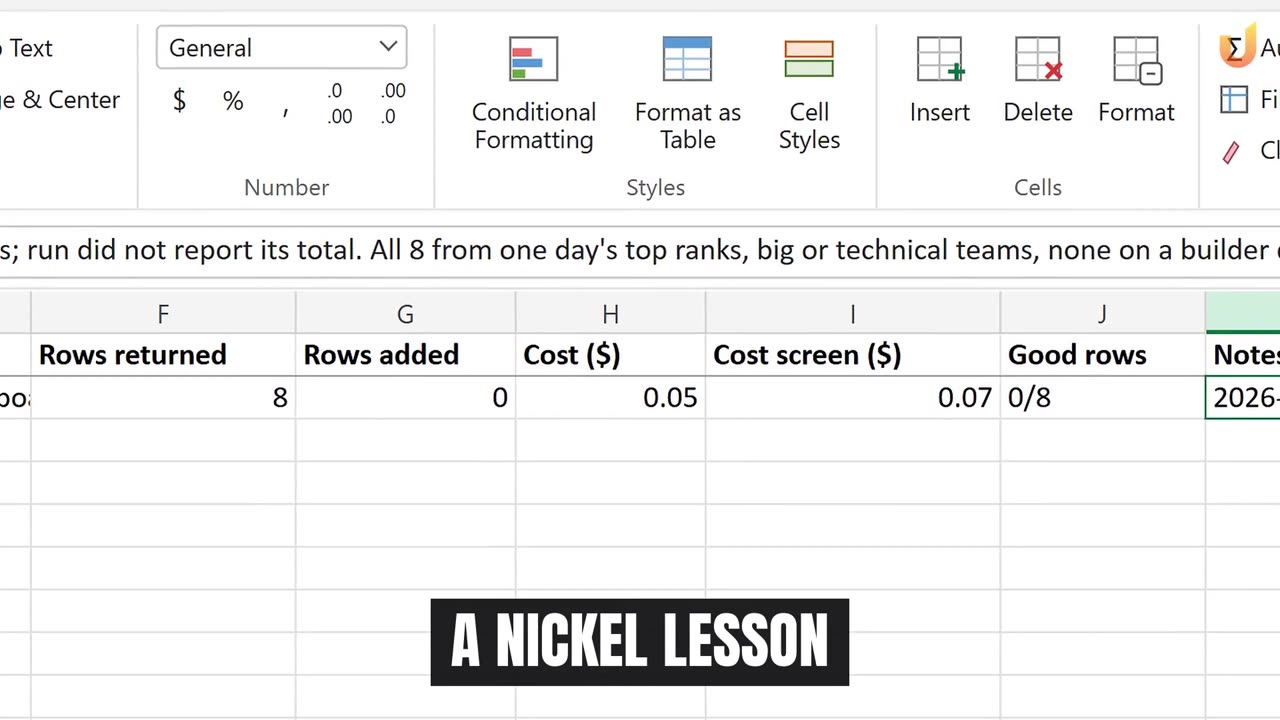
- A 10-row test first: 0 of 8 companies fit, for about 5 cents of Apify usage. Finding that out on 10 rows is the whole point.
- The fit check reads each company's own site, which is free on Apify.
- Everything together, the failed test included, cost about 5.5 cents of Apify usage. Your cost depends on the scrapers and how many rows you ask for.
- Apify's free plan needed no card when we checked on 24 November 2026. Check apify.com/pricing for what it includes today.
Rather not download a zip?
Open Claude Code in an empty folder, connect Apify, and send these messages one at a time. Wait for Claude to finish before you send the next one. It is the same text as NO-DOWNLOAD.md in the kit. Your files will not match ours word for word: the rules in each message are what matter.
1. I want to build my own system for finding clients with you and Apify. Set this folder up as a workspace for it. Write a CLAUDE.md that says what we're building and how you should work with me: one question at a time, numbered options, and never spend money on Apify without showing me the cost first and waiting for my yes. Test 10 rows before any big run, and check a company's own site before paying for its email.

2. Now build a skill that interviews me about who I should sell to. It reads my site, finds my competitors, asks me about my best and worst clients, and ends with 3 customer profiles I can turn into search filters, each with what the data can't prove.

3. Next skill: one that finds the right Apify scraper for a profile. It searches the Apify Store, checks each scraper live (runs that worked in the last 30 days, users this month, last update, price on my plan), tells me which are good and which are trash and why, then shows me a cost screen for a 10-row test.

4. Now the lead list. Build a skill plus a small Python script that saves leads into one Excel workbook in this folder: one sheet per list, a Sources sheet with every run and what it cost, and a do-not-contact sheet. It should only add rows, never overwrite mine, and back up first.

5. Add a skill that reads each company's own website and tells me who really fits before we pay for any emails.

6. Now emails. Build a skill that learns how I write from a few of my real messages, shows me 3 different styles on one real lead, lets me pick, then writes one email per lead using only facts from that lead's row, and skips leads with nothing real to say. It should read each draft back and remove anything that sounds like AI.

7. Last skill: export the emails I approve as a CSV I can import into Hunter, and offer to load them into Hunter as a paused draft. Never send anything.

8. Show me what we built.

9. Add a map to the top of CLAUDE.md: every file and skill in this folder, what it's for, and exactly when you should read it or use it, so you always know where to look.

---

Then say: who should I sell to?

Connect Apify first. Inside Claude Code, run these three:
/plugin marketplace add apify/apify-claude-code-plugin
/plugin install apify@apify
/reload-plugins
Then type /mcp, open the Apify entry, pick Enable, then Authenticate, and sign in to Apify in your browser.
These steps change now and then, so check docs.apify.com for the current ones.
Links
You need
- Claude Code
Comes with a paid Claude plan.
- Claude plans
- Apify
This is our affiliate link. If you sign up through it, Apify pays us a share, at no extra cost to you. Apify has a free plan with no card.
- Python
Free. On Windows, tick "Add python.exe to PATH" when you install.
Connecting Apify
- Apify docs
The current steps to connect Apify to Claude Code. The kit has them too, in SETUP.md.
- Apify pricing
What the free plan includes today.
Optional
- Hunter
Only to load the emails you approved as a paused draft. Nothing is sent until you start it yourself.
Credits
- Music and sound effects in the video: Stable Audio 3 by Stability AI
Stability AI Community License. Powered by Stability AI.